








Choosing the right vehicle tracking system is about more than simply seeing where a vehicle is on the map. For businesses, the best systems provide practical tools that help improve visibility, monitor vehicle activity, support driver accountability, and make day-to-day fleet management easier.
From real-time vehicle tracking, to speed alerts, Geo-Fence notifications, and reporting tools, each feature should give your business useful information that helps you make better decisions. The right system should also be simple to use, reliable, and built around the way your vehicles are used every day.
But with so many tracking devices and features available, it can be hard to understand which tools are right for your business. That’s why we’ve put together the top 10 vehicle tracking system features to consider, so you can get a better understanding of what is a priority when it comes to your fleet management.
What to look for in a vehicle tracking device
Before choosing a vehicle tracking device, it’s important to think about what your business needs from vehicle tracking.
Some businesses mainly need live location updates so they can see where drivers are during the working day. Others may need more detailed information, such as journey history, driver behaviour, vehicle speed tracking, mileage reports, or alerts when vehicles leave certain areas.
A strong vehicle tracking system should help you answer questions such as:
– Where are our vehicles right now?
– Are drivers taking efficient routes?
– Are vehicles being used outside agreed hours?
– Are speeding, idling, or harsh driving events happening?
– Can we provide customers with better arrival updates?
– Can we review previous journeys if there’s a dispute?
– Can the system grow as the fleet grows?
The best solution is one that gives you the right information without making the system difficult to use.
Useful vehicle tracking features at a glance
When comparing vehicle tracking features, you need to assess whether the system provides the right level of visibility and control for your business needs.
Here’s a handy checklist to help you decide what features you need from your vehicle tracking system:
| Tracking feature | What does it provide? |
| Real-time vehicle tracking | Shows where vehicles are in real time, which can help with job planning, route updates, and customer information. |
| GPS integration | Provides accurate map visibility so teams can see where vehicles are operating. |
| Vehicle speed tracking system | Helps monitor speeding events and support safe driving conversations. |
| Journey history | Allows businesses to review routes, mileage, and previous activity. |
| Geo-Fence alerts | Notifies teams when vehicles enter or leave key locations. |
| Smart notifications | Highlights important events without needing constant manual checks. |
| Driver behaviour insights | Helps identify driving patterns that may affect safety, fuel use, or vehicle wear. |
| Mobile and desktop access | Gives managers access to tracking information whether they’re in the office or on the move. |
| Tracker information reports | Turns vehicle data into useful reports for decision-making. |
| Scalability and support | Helps the system grow with the fleet and ensures help is available when needed. |
10 vehicle tracking system features to consider
We’ve quickly glanced at some of the top tracking features, but let’s explore these in more detail:
1. Real-time vehicle tracking
Real-time vehicle tracking is one of the most important features to look for in any tracking system.
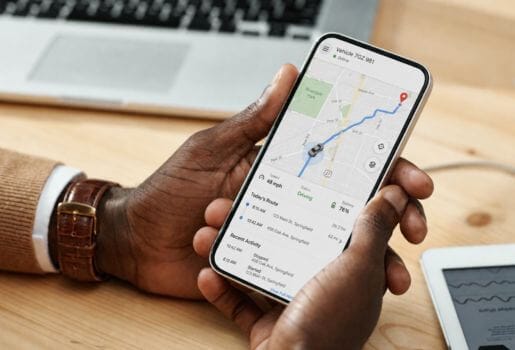
This feature allows your business to see where vehicles are at any given time. Instead of relying on phone calls, manual updates, or guesswork, managers have the ability to check live locations through a desktop platform or mobile app.
Real time tracking is particularly useful for businesses with mobile teams, delivery drivers, service vehicles, vans, trucks, or multi-site operations. It can help with route planning, customer updates, job allocation, and responding quickly if a vehicle is delayed or moves unexpectedly.
When comparing systems, check how frequently the location updates, how accurate the mapping is, and whether the platform is easy to use during a busy working day.
2. GPS integration
A vehicle location system, like a GPS tracker, should provide clear, accurate, and reliable location data.
This is important because poor location accuracy can make tracking less useful. If vehicle positions are delayed, unclear, or difficult to interpret, managers may still need to contact drivers for updates, and this ultimately reduces the value of the system.
A good GPS tracker should show vehicles clearly on a map, make it easy to identify individual vehicles, and provide enough detail to support route planning, job management, and customer communication.
For larger fleets, location accuracy also helps teams understand vehicle availability across different depots, sites, or service areas.
3. Vehicle speed tracking
Vehicle speed tracking helps businesses monitor how vehicles are being driven. Speed tracking can highlight when a vehicle exceeds certain speed limits or when driving behaviour may need attention. This can support safer driving, reduce unnecessary risk, and help fleet managers identify patterns across the business.
For commercial fleets, speed tracking can also be useful when reviewing customer complaints, insurance queries, or internal driver performance. When used responsibly, it provides useful information for coaching and accountability.
When comparing systems, look for speed alerts, reports, and road speed data that can be reviewed clearly rather than buried in the platform.
4. Journey history and route replay
Journey history allows you to look back at where a vehicle has been, which routes were taken, and when journeys started or ended.
This is one of the most useful features for businesses because it provides a clear record of vehicle activity. It can help confirm whether a vehicle visited a customer site, review mileage, investigate delays, or understand how routes are being used over time.
Route replay can also be useful when handling customer queries. If a customer asks when a driver arrived or whether a vehicle attended a location, journey history can provide evidence without relying entirely on memory or manual notes.
A good system should make historic vehicle data easy to access, filter, and understand.
5. Geo-Fence alerts
Geo-Fence alerts allow businesses to create virtual boundaries around important locations.
These locations might include depots, customer sites, service areas, restricted zones, or areas where vehicles shouldn’t be used outside working hours. When a vehicle enters or leaves a Geo-Fenced area, the system can send an alert.
This feature can help businesses monitor vehicle movement more proactively. Rather than checking every vehicle manually, managers can be notified when something important happens.
Geo-Fence alerts are especially useful for businesses that want to monitor depot departures, site arrivals, out-of-hours movement, or vehicles entering areas outside their usual operating zone.
6. Smart alerts and notifications
Smart vehicle tracking shouldn’t require someone to sit in front of a screen all day.
Alerts and notifications help businesses stay informed when specific events happen. These might include speeding, out-of-hours movement, Geo-Fence activity, harsh driving events, long idling periods, or unexpected vehicle use.
The value of smart alerts is that they help managers focus on the activity that needs attention. Instead of manually reviewing every journey, the system can highlight key events.
When choosing a system, look for alerts that can be customised to your business. Different fleets will need different notifications, so flexibility is important.
7. Driver behaviour insights
Driver behaviour insights help businesses understand how vehicles are being driven. Depending on the tracking system, this may include information such as speeding, harsh braking, harsh acceleration, idling, or unusual driving patterns. This data can help fleet managers identify where extra support, training, or communication may be needed.
Driver behaviour reporting can also support safer driving and help reduce avoidable vehicle wear, fuel waste, and operational risk.
The best systems present driver information in a clear and practical way. Reports should be easy to understand and should support constructive conversations rather than simply collecting data without context.
8. Mobile app and desktop access
A good vehicle tracking system should be accessible from both desktop and mobile devices. Desktop access is useful for fleet managers, office teams, and operations staff who need to review multiple vehicles, reports, and journeys throughout the day. Mobile access is useful for managers who are on the move, working remotely, or away from the office.
Mobile app support means users can check vehicle locations, receive alerts, and access important tracker information without needing to be at a desk.
When comparing systems, look for a platform that is easy to use across different devices and doesn’t require technical knowledge to access basic tracking information.
9. Reporting and tracker information
The best vehicle tracking systems do more than show live locations. They also provide useful reports and tracker information that help businesses understand how vehicles are being used.
Reports may include mileage, journey history, driver behaviour, idling, speeding, arrival times, departure times, and vehicle usage patterns.
This information can help businesses identify inefficiencies, improve route planning, review driver performance, and support customer service.
For example, if a vehicle is regularly taking longer routes, spending too much time idling, or being used outside normal hours, reporting tools can help make this information visible.
The key is to choose a system that turns tracking data into clear, useful information.
10. Integrations, scalability, and ongoing support
As a business grows, its vehicle tracking needs may change.
A tracking system should be able to scale with the business, whether you’re adding more vehicles, managing different vehicle types, or introducing additional features. This is especially important for businesses with mixed fleets, including cars, vans, trucks, HGVs, trailers, or plant or mobile assets.
Integrations can also be useful where tracking data needs to connect with other business systems. This can help businesses manage data more efficiently and reduce manual admin. Ongoing support is just as important as the software itself. A vehicle tracking system should be backed by a support team that can help with setup, troubleshooting, reporting, and future requirements.
Get in touch to learn how we support smarter vehicle tracking
At Fleetsmart, we provide vehicle tracking solutions for businesses that need clearer visibility over their vehicles, drivers, and daily operations.
Our system supports real-time vehicle tracking, location visibility, journey history, driver behaviour insights, Geo-Fence alerts, reporting tools, and useful add-ons that help businesses manage their fleet more effectively.
We also support a wide range of vehicle types, including company cars, vans, trucks and HGVs, trailers, and plant and wider mobile assets. Whether you manage a small number of vehicles or a growing fleet, our platform is designed to make tracking easier to use and more useful for your business.
If you’d like to learn more about our vehicle tracking devices and system features, or you want to understand what type of tracking system would work best for your business, get in touch with our team to discuss your vehicle tracking requirements in more detail.
Vehicle tracking system features FAQs
What is real-time vehicle tracking?
Real-time vehicle tracking allows businesses to see where their vehicles are at any given time. This helps with route planning, customer updates, driver visibility, and responding quickly when vehicles are delayed or move unexpectedly.
What information should a vehicle tracker provide?
A good vehicle tracker should provide useful information such as live location, journey history, mileage, route data, and driver behaviour insights. The best systems present this information clearly so it can support practical business decisions.
What are vehicle location systems?
Vehicle location systems use GPS technology to show where vehicles are. For businesses, this can help monitor mobile teams, review routes, manage jobs, and provide more accurate updates to customers.
What is smart vehicle tracking?
Smart vehicle tracking combines real-time location data with useful tools such as alerts, reports, driver behaviour insights, Geo-Fence notifications, and mobile access. This helps businesses manage vehicles more proactively.
What is an auto track system?
An auto track system is a tracking system that automatically records vehicle location, journey history, and activity. This helps businesses reduce manual updates and gives managers clearer information about how vehicles are being used.